

How it worksWhat happens after you order?
What happens after you order? The waiting steps and your vault
Once the payment is confirmed, most of the work is no longer yours: LaunchUS hands the file to the LaunchUS Registered Agent team, the Registered Agent files with the state, and the state and the IRS decide. This article explains what is expected from you at each waiting step and which documents fill your vault.
Five steps, and who does each
You get a panel notification and an email at every status change. The state and the IRS work on their own schedules.
- Step 1. LaunchUS
Your details are checked
Once your payment arrives, our team checks your answers. If something is missing we ask you in the panel, and the process continues where it stopped once you complete it.
- Step 2. State
The state reviews the filing
The formation filing is sent to the state through the LaunchUS Registered Agent service. Nothing is expected from you while this happens.
- Step 3. You
The SS-4 form waits for your signature
For the EIN application you sign the SS-4 form by hand and upload it in the panel.
- Step 4. IRS
The IRS processes the application
Your form is sent to the IRS and the IRS processes it. When your EIN letter (CP 575) arrives it is added to your vault and we let you know.
- Step 5. LaunchUS
Your documents are in the vault
Your Articles of Organization, Operating Agreement and EIN letter land in your document vault. You get a panel notification and an email at every status change.
For short answers see the most common questions about a US company, and for terms see US company terms in 30 seconds.
Who owns the timelines?
Typical ranges from your payment, for a complete order with a verified passport: state approval 1–9 business days in Wyoming and 3–19 business days in Delaware; a no-SSN EIN 4–16 weeks in Wyoming and 4–18 weeks in Delaware. They are estimates based on the processing times published by the state and the IRS, and both may change; LaunchUS makes no promise about these times. Your portal shows each step’s estimated dates, status, who acts next and the last update date, and we notify you of changes by e-mail.
What do you do at the waiting steps?
There are four waiting points. Most of them need nothing from you; one needs your signature.
The state is reviewing the filing
Who actsState
Nothing is expected. If the state asks for more information, LaunchUS passes it to you through the portal.
The IRS application (SS-4) is awaiting your signature
Who actsYou
You sign the form with a wet signature and scan it; the IRS does not accept photos. The Registered Agent team sends the form to the IRS.
The IRS is processing the application
Who actsIRS
Nothing is expected. When the EIN letter arrives, LaunchUS adds it to your vault and notifies you.
Documents are being added to the vault
Who actsLaunchUS
You view and download the documents and follow the annual obligation dates in the portal.
Mavera Labs LLC
WYLLCFile LU-0231
Updated Jun 16, 2026
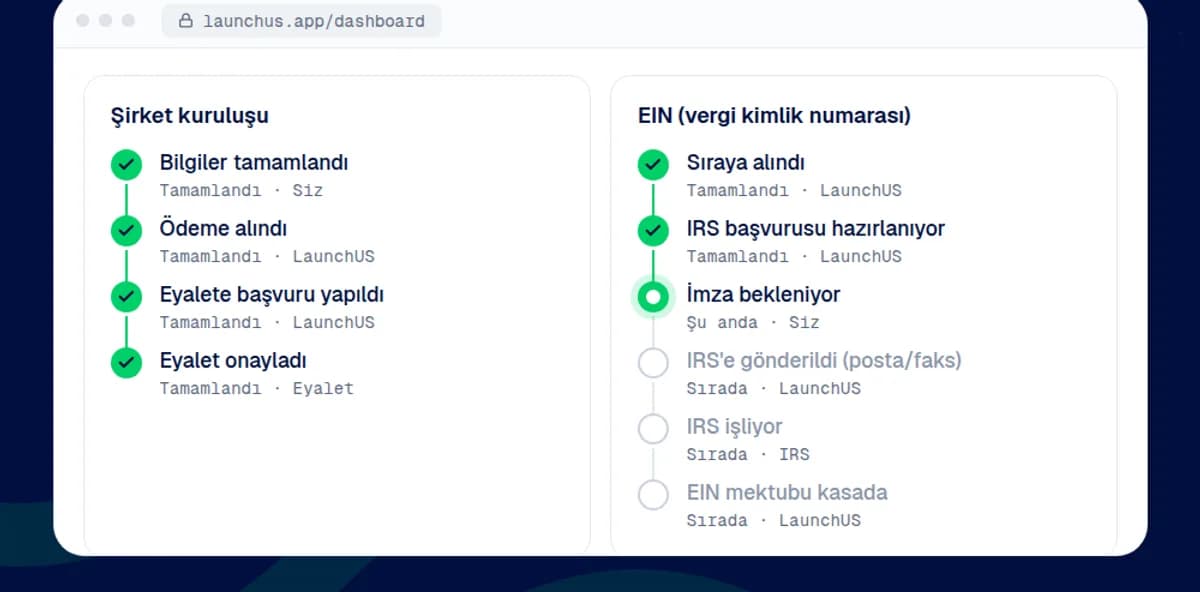
Company formation
Information complete
DoneDate:
Payment received
DoneDate:
Handed to the Registered Agent
DoneDate:
LaunchUS handed your formation details to the Registered Agent. Next: the state filing.
Filed with the state
DoneDate:
State approved
DoneDate:
Documents in your vault
DoneDate:
EIN (tax ID)
Queued (waiting for formation approval)
DoneDate:
IRS application in preparation
DoneDate:
LaunchUS prepared your IRS application (SS-4).
Awaiting signature
In progressNext step is yours: the IRS application needs your signature. LaunchUS sends you the signature step from the dashboard.
Next: YouSent to the IRS (mail/fax)
Up nextIRS processing
Up nextEIN letter in your vault
Up next
How does your vault fill?
Documents are listed in the order they arrive, with a category label. The source is on every row: the Registered Agent, the LaunchUS team or your own upload.
- 1
Formation documents
The formation document approved by the state (Articles of Organization in Wyoming, Certificate of Formation in Delaware) arrives through the Registered Agent.
- 2
EIN letter
When the IRS EIN confirmation letter (CP 575) arrives, the LaunchUS team adds it to the vault.
- 3
Registered Agent documents
The registered agent acceptance letter and the annual service documents sit in this category.
- 4
Mail scans
If you ordered mail scanning, letters that arrive at your US address are scanned and listed in the Mail category.
Mavera Labs LLC
WYLLCFile LU-0231
Document vault
- Formation
Articles of Organization
Registered Agent · · PDF 242,7 KB
- Registered Agent
Registered Agent acceptance letter
Registered Agent · · PDF 40 KB
- EIN
EIN confirmation letter (CP 575)
LaunchUS team · · PDF 94,1 KB
Mail scan
Registered Agent · · PDF 500 KB
How are you kept informed?
You receive a portal notification and an e-mail on every status change; LaunchUS sends the notification. When something is expected from you, a next-step line and a single button appear at the top of the portal.
Other articles in this series
- Which service when?Stripe/PayPal readiness, marketplace selling, freelancing or an agency: which services you order together for your goal.
- How do you order?Onboarding, quote, payment, timeline and document vault: who does what in five steps.
- Founder programs and perksCloud credits and tool programs you can apply to with a US company; an official source on every row, no amounts.
State guides
Choosing a state is not the subject of this series; the Wyoming and Delaware guides and the comparison page give the decision framework.
What we do not do
- We do not give legal, tax or accounting advice.
- We do not file with the state ourselves; the filing goes through the LaunchUS Registered Agent service, we prepare and track.
- We do not issue the EIN; the IRS issues the number, we prepare and track the application. Approval and timing are not guaranteed.
- We do not open bank, payment-provider or marketplace accounts, and we do not guarantee their approval.
- State/government fees are not included in our service fee; they are shown separately and may change.
Start your order.
Create your account and enter your details. LaunchUS reviews them, prepares your filing and puts every document in your vault.
Start your company